


How to Audit, Edit, and Elevate Content for Search + Accessibility
Auditing your website before migration is the perfect time to take stock of what’s working and what’s not. Each page you review reveals how effectively your content communicates your unit’s purpose and serves its audiences. This guide helps you evaluate your existing pages for clarity, accuracy, accessibility, and search performance—so that by the time your content moves into the new templates, it’s organized, relevant, and easy to find.
The goal is to bring only your strongest, most useful content into the new site. By auditing now, you’ll eliminate outdated or redundant material, strengthen what remains, and ensure your pages are ready to perform well in the new environment.
1. Why Optimization Matters
What is SEO, GEO and AEO?
Search Engine Optimization (SEO) is the process of improving your website so it appears higher in search results on Google and other search engines. It includes both on-page factors (titles, meta descriptions, headings, structure, and readability) and off-page factors (links from other reputable sites, domain authority, and content relevance). When done well, SEO helps the right people find your programs, services, and expertise exactly when they’re looking for them.
Search technology has evolved far beyond traditional Google results. Modern optimization now includes:
- GEO (Generative Engine Optimization): Preparing your content so it can be accurately summarized and surfaced in AI Overviews and other generative search experiences, like Google’s Search Generative Experience (SGE). GEO focuses on clarity, factual accuracy, and structured information that AI can easily interpret and repurpose.
- AEO (Answer Engine Optimization): Structuring your content so AI-driven assistants and voice tools like ChatGPT, Gemini, Bing Copilot, or Alexa can extract precise, trustworthy answers to user questions. AEO emphasizes concise explanations, schema markup, and question-based headings that align with how people ask for information conversationally.
Together, SEO, GEO, and AEO ensure your content performs across every type of search, including traditional, voice, and AI-generated. The principle behind all three is the same: write with clarity, authority, and purpose. When your pages are accurate, well-organized, and easy to understand, both people and AI systems recognize them as credible sources of information.
What is Accessibility?
Accessibility ensures all people, including those using assistive technologies, can read, navigate, and interact with your content. Accessible pages improve user experience for everyone: readable text benefits mobile users, keyboard-friendly layouts help speed, and descriptive headings make content skimmable.
Accessibility is not optional. Federal requirements (Title II / WCAG 2.2 AA, effective April 24, 2026) require that all public-facing university websites meet accessibility standards. Optimizing your content now supports compliance and future-proofs your site.
2. The Foundations of a Strong Page
Every page should:
- Have one clear purpose (inform, apply, contact, learn more)
- Be written for a defined audience (prospective students, faculty, researchers, alumni, etc.)
- Contain one primary keyword (the topic or search phrase) and one secondary keyword (a related phrase)
- Use headings and structure to guide readers through information
- Include a clear next step or call to action
If your page tries to do everything, it will do nothing well. Define each page’s reason for existing before you start editing it or creating more.
3. Pre-Launch Checklist
Before editing or migrating a page, confirm that:
- You’ve identified the page’s audience and goal
- You’ve chosen primary and secondary keywords
- Your title tag and meta description include those keywords
- There’s exactly one H1 heading, and all other headings form a logical outline
- You’ve checked links, alt text, and readability
- The page answers: “What should a visitor do next?”
Small, consistent improvements to these areas can dramatically improve both SEO and accessibility.
4. How to Audit Existing Pages
Auditing is how you take stock of what’s working, what’s outdated, and where you can improve. You can complete this process manually, through your CMS, or by using our downloadable Web Content Audit Workbook.
Step 1: Inventory
Gather every page under your unit’s site. Record:
- Page title and current URL
- Purpose (what it’s trying to achieve)
- Target audience
- Owner/editor and last checked date
- Traffic or analytics (if available)
- Notes about issues (broken links, outdated info, unclear purpose)
An inventory creates a master record of what exists before migration.
Step 2: Evaluate Quality
Ask these questions for each page:
- Is it relevant? Does it still reflect current programs or services?
- Is it accurate? Are dates, numbers, and policies up to date?
- Is it optimized? Do the title, meta description, and headings include keywords?
- Is it accessible? Does it meet readability, contrast, and alt-text standards?
- Is there a clear call to action? Can visitors easily find what to do next?
Rate each page: Keep / Revise / Remove.
Removing outdated pages can improve your search results by reducing clutter and helping
Google (and you!) focus on your most relevant content.
5. Writing for SEO (But Really for People)
Optimizing your writing doesn’t mean stuffing keywords. It means being intentional with structure and phrasing so readers and search engines understand your content equally well.
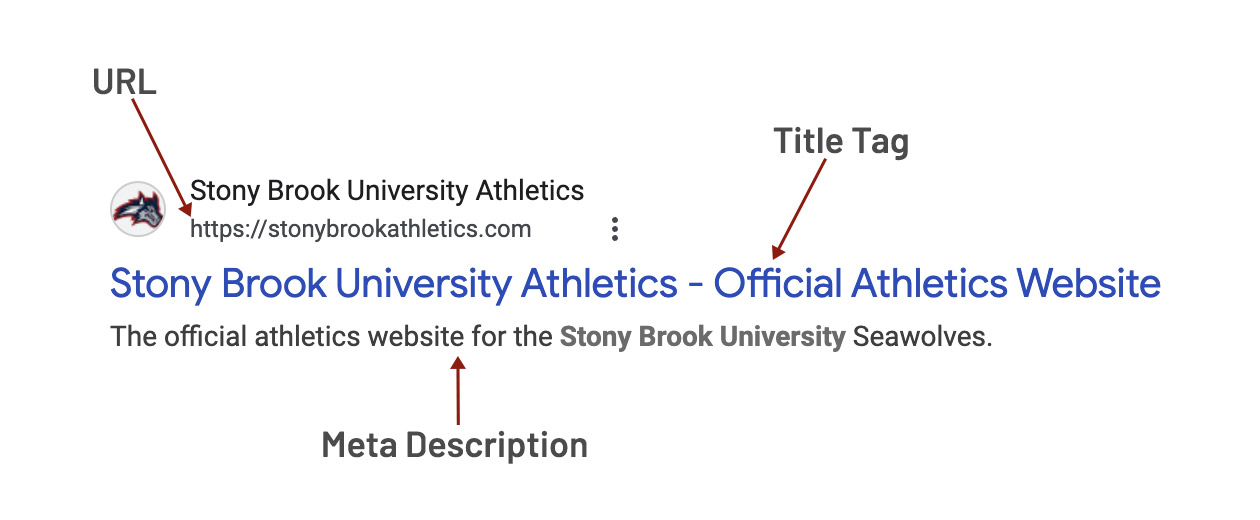
The graphic breaks down the anatomy of a search engine results page (SERP): the URL,
which tells users where the page lives; the title tag, which is the main clickable
headline Google displays; and the meta description, a short summary that helps users
decide whether to click. When these elements are written clearly and strategically,
they improve both user experience and search visibility.
|
Element |
How to Optimize |
Why It Matters |
|
Title Tag |
Include your primary keyword and “Stony Brook University” at the end. Example: Physician Assistant Program | Your Department | Stony Brook University |
The title tag is the main clickable headline in search results. It helps search engines understand the page topic and helps prospective students quickly confirm they’ve found the correct program, improving visibility and click-through rates. |
|
Meta Description |
Write 1–2 sentences (140–160 characters) summarizing the page with your secondary keyword and a call to action. Example: “Earn your physician assistant degree at New York’s top public university. Fully accredited – Apply now.” |
Meta descriptions appear below your title in search results and can increase clicks. Always include a call-to-action to entice people to click. |
|
URL |
Use lowercase, short, readable URLs with hyphens instead of spaces. Example: /programs/pa-school |
Clean URLs signal professionalism and help Google understand your structure. |
|
Headings |
One H1 per page. Use H2/H3 for subtopics, as you would an outline. You can have up to level H6. |
Proper heading hierarchy improves both readability and accessibility. |
|
Internal Links |
Link to related pages (admissions, contact, news). |
Strengthens site structure and user flow. |
|
Images |
Include descriptive alt text and relevant filenames. |
Supports accessibility and image search visibility. |
Rule of thumb
If you removed all design and images, would the text still make sense and flow logically?
If yes, your content is structured correctly.
6. Keyword Research and Mapping
Every optimized page focuses on a specific search intent—what a user is trying to accomplish when they type something into Google.
Step 1: Create a Keyword List
Use our Web Content Audit Workbook to enter and keep track of your selected keywords for each page.
Use one consistent tool (Ubersuggest, SEMRush, or Google Keyword Planner) to find
keyword ideas. Note search volume (MSV), competition, and relevance.
Pro tip: MARCOM is contracted with Conductor, an SEO tool that can help you identify
keywords and manage your SEO program. Request a seat (at no cost to you) by filling out this form.
Step 2: Assign Keywords by Page
Each page should have:
- Primary keyword: the main term describing the topic (e.g., “PA school”)
- Secondary keyword: a supporting phrase (e.g., “physician assistant program”)
Avoid using the same primary keyword on multiple pages, as it causes keyword cannibalization, where two of your own pages compete with each other on search engines.
Step 3: Balance Broad and Narrow Keywords
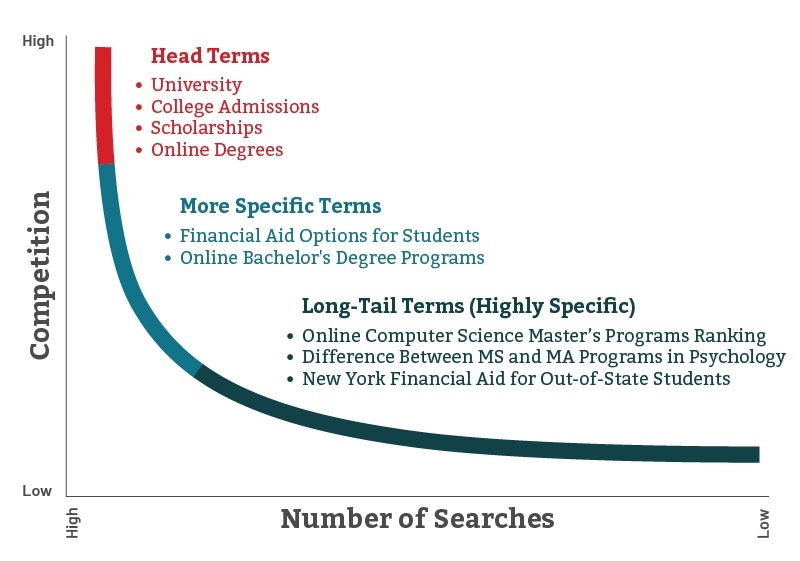
- Head terms (broad): “health professions degrees” are high search volume, higher competition (harder to rank high for), and good for top-level pages.
- Long-tail keywords (specific): “apply to Stony Brook physician assistant program” are lower volume, lower competition (easier to rank for), and great for program or detail pages.
A good website mixes both. Head terms drive awareness; long-tails drive conversions.
7. On-Page Optimization
Now that you have keywords, align your actual content.
- Incorporate the primary keyword naturally into your title, first 100 words, one H2, and closing paragraph.
- Include the secondary keyword once or twice elsewhere.
- Use synonyms and natural phrasing. Google understands context, so focus on clarity, not repetition.
- Use structured headings to organize information like an outline.
- End with a clear CTA. Example: “Ready to apply? Visit our Admissions page.”
Check Accessibility
While optimizing, ensure:
- Alt text describes function (e.g., “student performing ultrasound in clinical lab”)
- Links are descriptive (“View admissions requirements”)
- Tables have headers and captions
- Paragraphs are short and scannable
Accessibility and SEO often overlap. Both reward well-structured, human-friendly content.
8. Accessibility and Readability
Readable content isn’t “dumbing down,” but ensuring everyone can understand your message quickly.
Guidelines:
- Aim for a 7th–8th grade reading level (Silktide can help with this).
- Use plain language (say “apply” instead of “submit your application materials”).
- Replace jargon with simple definitions.
- Break up long paragraphs into smaller sections with subheadings.
- Use bulleted lists for key takeaways.
- Avoid images of text.
- Include captions or transcripts for videos.
Accessible content improves comprehension, keeps users on your page longer, and demonstrates institutional care for inclusion.
9. After You Publish
Optimization doesn’t end at launch. It’s your responsibility as a web editor to continuously cycle review and improve your site.
Set Review Cadence
- Quarterly: Check analytics (top pages, bounce rate, time on page).
- Annually: Refresh outdated information, statistics, program details, and links.
- Ongoing: Add new pages when new keywords or topics emerge.
Editorial Calendar
Create a shared calendar or sheet listing:
- Each page or section
- Responsible editor or owner
- Review frequency
- Next review date
Regular maintenance ensures your site remains current and trustworthy, which are two signals search engines reward.
10. Common Mistakes to Avoid
- Keyword stuffing: repeating phrases unnaturally (“Looking for a PA program? Our PA program is the best PA program for students who want a quality PA program. This PA program offers PA program courses that make our PA program stand out.”).
- Missing headings: text with no clear structure or only bolded labels.
- Generic CTAs: “Click here” or “Learn more” with no context.
- Broken links or images.
- Copy-pasting from Word without cleaning formatting.
- Outdated dates, staff names, or statistics.
Always prioritize clarity, structure, and truthfulness.
11. Tools and Resources
|
Tool |
Purpose |
|
SEO Meta in 1 Click (Chrome) |
Instantly view a page’s title, meta, headers, and links |
|
Silktide |
Check reading grade and sentence clarity |
|
PowerMapper / Lucid.app |
Build visual sitemaps |
|
Conductor |
Keyword discovery and volume checks |
|
Silktide |
Test accessibility errors and color contrast |
|
Conductor, Google Analytics, Looker Studio |
Track page performance post-launch |
|
Silktide, Conductor |
Request a full scan to identify all URLs and redirects |
12. Resources You Can Download
Includes two tabs:
- Content Inventory – all URLs, titles, owners, last checked, evaluation fields for SEO, accessibility, readability and more
- Migration Map – old and new URLs, which we will use to track redirects when we switch your website from the old environment to the new
Thank You
Every improvement helps us meet the April 2026 accessibility deadline and ensures our web presence reflects the same excellence found across Stony Brook University.